ShopDreamUp AI ArtDreamUp

Deviation Actions






Description
--Update--
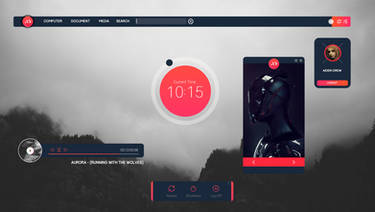
Uploaded a more recent shot. Doesn't show much more than before except the start page and stuff (thanks ~Brandon-G)
The real update is here. Progress on this is at around 85% now, however I won't be releasing this before a few weeks.
That's because I'll be making a white version once I'm done! Yay for better everyday-use and stuff.
Anyway that's it. Please let me know what you think!
------------------------------------------------------------------------------
So if you've seen my Planisphere concept then this looks familiar.
The theme is under development and progress is at around 75%. It will include a calibri version too so it's easier on the eyes.
It will be a full suite in collab with ~Brandon-G who's made the rainmeter skin seen on this screenshot, and is also working on a few more awesome things
[link]
Icons: [link] by *dAKirby309
Wallpaper: [link] by ~Zim2687
Uploaded a more recent shot. Doesn't show much more than before except the start page and stuff (thanks ~Brandon-G)
The real update is here. Progress on this is at around 85% now, however I won't be releasing this before a few weeks.
That's because I'll be making a white version once I'm done! Yay for better everyday-use and stuff.
Anyway that's it.
Please let me know what you think!------------------------------------------------------------------------------
So if you've seen my Planisphere concept then this looks familiar.
The theme is under development and progress is at around 75%. It will include a calibri version too so it's easier on the eyes.
It will be a full suite in collab with ~Brandon-G who's made the rainmeter skin seen on this screenshot, and is also working on a few more awesome things
[link]
Icons: [link] by *dAKirby309
Wallpaper: [link] by ~Zim2687
Image size
1366x768px 775.58 KB
© 2013 - 2024 Nittiyh
Comments49
Join the community to add your comment. Already a deviant? Log In
how do you change the "Favorites" and "libraries" ICON! i got everything changed besides those two! help